Curio
A swipe-based fashion marketplace that learns your taste.
- My part
- Founder: design and engineering
- When
- October 2025 to March 2026
- Team
- Founding team of four
Right to like. Left to pass. Up for the cart.
The real app, recorded.
The catalogue builds itself
Read off the brands’ own sites. Every photo is looked at.



- Collect: every listing and its photos are gathered from the brand’s own site.
- Clean: the messy listing is rewritten into tidy, consistent details.
- Find: the garment is found in the photo and everything around it is cropped away.
- Describe: the garment is described four ways, by shape, colour, texture and mood.
- Remember: the four descriptions are kept, so the app can recommend by any of them.
Four reasons to like a shirt
Swipe a few cards. The deck works out which of the four you are choosing by.
- Shape
- weight 1.00
- Colour
- weight 1.00
- Texture
- weight 1.00
- Mood
- weight 1.00
A new shopper: all four count the same.
Curio

Where the next card comes from
Likes raise the ground. The deck is dealt from the top of the hill.
An animated drawing of gently rolling, dark ground scattered with products. As the shopper likes products in one area, the ground there rises into a brightly coloured hill, and the next cards are dealt from the top of that hill, with an occasional card from elsewhere.
A stylist in your pocket
Everything you liked, kept
The other side: brands
A seller connects their store and the catalogue arrives on its own.
Built with
- Flutter
- FastAPI
- Supabase
- Qdrant
- Next.js
- React
- Razorpay
- Cloud Run
Work stopped in March 2026. The website is still up.
Visit curiofashion.com (opens in a new tab)Every screen, dealt out
Nine screens from the March 2026 build, as they were.

The deck 
A like 
Add to cart 
Product page 
Liked items 
Stylist menu 
Stylist chat 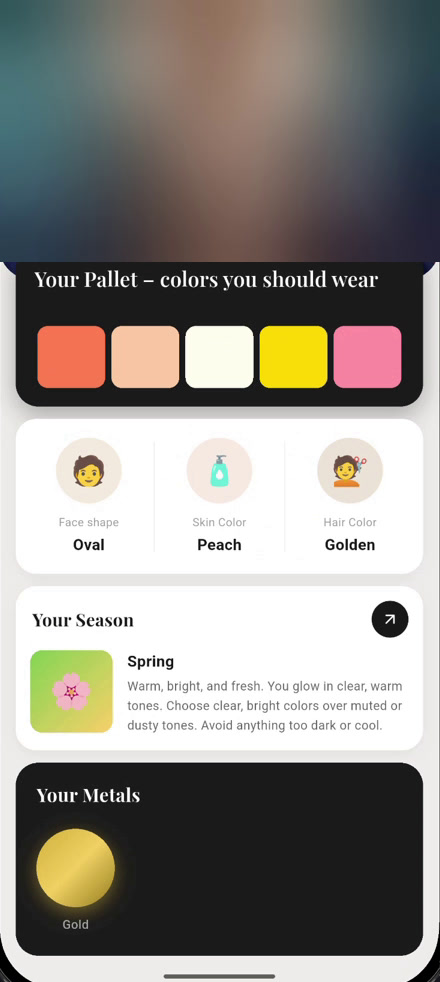
Colour analysis 
Profile